HESCO New Connection Application Process 2026: Complete Online Guide
Last updated: 20 June 2026 · By Amir Hanif
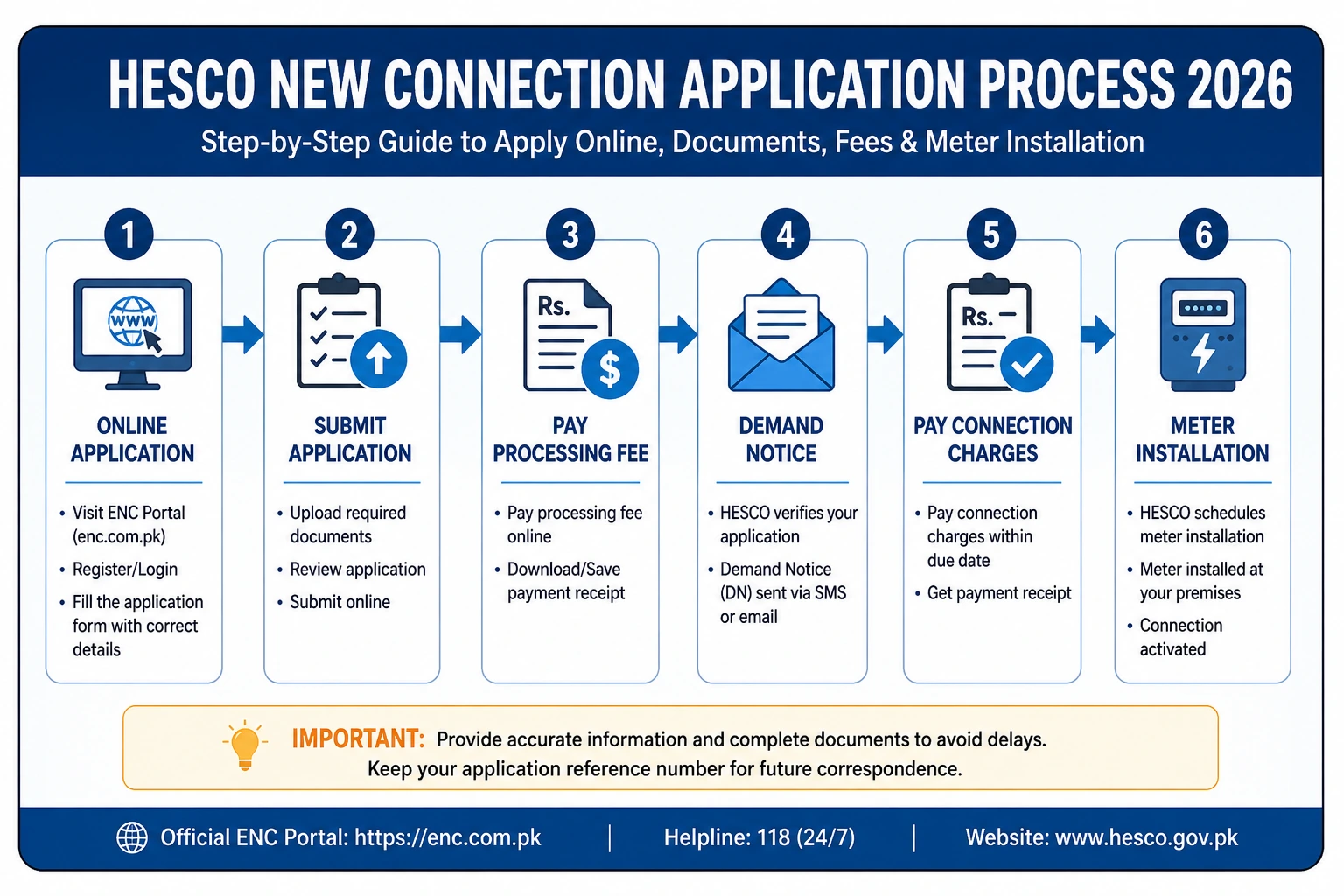
The HESCO new connection application process starts online at the ENC portal (enc.com.pk). Click “Apply”, select HESCO and your subdivision, fill the form, and upload your CNIC, property ownership proof, witness CNICs, a neighbor’s bill, and a wiring test report. After document verification and a site survey, HESCO issues a demand notice, you pay it online or at a bank, and your meter is installed — typically within 15–30 days for a single-phase connection.
Getting a new electricity meter from the Hyderabad Electric Supply Company (HESCO) used to mean long queues, manual forms, and repeated office visits. Not anymore. Thanks to the government’s centralized Electricity New Connection (ENC) system, the entire application can now be completed online from your home or office.
This guide walks you through every step of the HESCO new connection application process in plain English — what to prepare, how to apply, how the demand notice works, and what to expect at each stage. We have based the details on HESCO’s published procedure and the official ENC workflow used by all Pakistani distribution companies.
What Is the HESCO New Connection Application Process?
The HESCO new connection application process is the official procedure for getting a fresh electricity meter installed at a home, shop, office, or industrial unit within HESCO’s service area. It follows a clear digital workflow managed through the ENC portal.
In simple terms, the process has five main stages:
- Apply — submit your form and documents online via the ENC portal.
- Verify — HESCO checks your documents and conducts a site survey.
- Demand Notice — HESCO issues an itemized payment voucher.
- Pay — you clear the demand notice online or at a designated bank.
- Install — HESCO installs and energizes your new meter.
The same ENC system is shared by other distribution companies including LESCO, IESCO, MEPCO, FESCO, GEPCO, PESCO, SEPCO, and QESCO, so the process is standardized nationwide under WAPDA and NEPRA.
Who Can Apply for a HESCO New Connection?
Anyone residing or doing business within HESCO’s serving jurisdiction can apply. HESCO covers a wide area of Sindh, including Hyderabad, Jamshoro, Thatta, Badin, Matiari, Tando Allahyar, Tando Muhammad Khan, Sujawal, Dadu, Mirpurkhas, Tharparkar, Umerkot, and Sanghar.
Connections are available for several categories:
- Domestic — homes, flats, and residential buildings
- Commercial — shops, offices, and plazas
- Industrial — factories, workshops, and manufacturing units
- Temporary — construction sites and short-term usage
Documents Required for a HESCO New Connection
Having the right paperwork ready is the single biggest factor in avoiding delays. Incomplete applications are the most common reason for rejection. Prepare these before you start.
| Document | Details |
|---|---|
| CNIC copy | Attested copy of applicant’s CNIC (both sides) |
| Ownership proof | Registry, Fard, or sale deed of the property |
| Witness CNICs | Attested CNIC copies of two witnesses |
| Neighbor’s bill | Recent electricity bill for feeder reference |
| Wiring test report | From an approved/licensed electrician |
| Undertaking | Signed statement of no existing meter or arrears |
| Photographs | Two passport-size photos |
| Connection form | Completed ENC application form |
How to Apply for a HESCO New Connection Online (Step by Step)
The online route is the fastest and most convenient. Here is the full step-by-step process through the ENC portal.
Step 1 — Open the ENC Portal
Go to the official Electricity New Connection portal at enc.com.pk. On the left sidebar you will see options such as Home, Apply, Change, Track, Print Form, Upload DN, Print DN, and Pay DN. Click Apply.
Step 2 — Select HESCO and Your Subdivision
Choose HESCO as your electricity provider, then select the subdivision that matches your location. This ensures your application reaches the correct office.
Step 3 — Fill in the Application Form
Enter your personal details and information about the premises, such as property size and neighboring properties. This helps HESCO assess the load and plan the connection.
Step 4 — Upload Your Documents
Attach clear scanned copies of all required documents in JPG or PDF format. Double-check that each file is readable before uploading.
Step 5 — Submit and Save Your Tracking ID
Click Submit. You will receive an acknowledgment by SMS or email with a tracking ID. Save this — you will use it to monitor your application.
Step 6 — Wait for Verification and Survey
HESCO reviews your application, verifies the documents, and sends a survey team to assess the load and service-line distance at your premises.
Step 7 — Pay the Demand Notice
Once approved, HESCO issues your demand notice. Pay it online via card or mobile wallet, or at a designated bank. After payment is verified, your meter is installed.
✅ Quick Online Application Checklist
- Scan all documents in clear JPG or PDF before starting
- Know your subdivision and required load (kW)
- Have a neighbor’s bill handy for feeder details
- Save your tracking ID immediately after submitting
- Keep your paid demand notice receipt safe
How to Apply Offline (In Person)
If you prefer the manual route, you can still apply at your nearest HESCO sub-division office. Collect the connection form, attach physical copies of all required documents, and submit them at the office. The verification, demand notice, and installation stages then follow the same path as the online process. For most applicants, however, the online ENC method is faster and easier to track.
HESCO New Connection Fees and Charges
The connection charge is just one part of your total cost. The full amount appears on your demand notice after the survey.
| Charge | Amount |
|---|---|
| Single-phase connection | Rs.3,000 (Rs.300 + 9 × Rs.300) |
| Security deposit (urban) | ~Rs.1,620 per kW (refundable) |
| Security deposit (rural) | ~Rs.850 per kW (refundable) |
| Service line (standard) | Included up to ~40 m |
| Extra cable beyond 40 m | ~Rs.200 per extra meter |
For a full breakdown of every cost, see our detailed guide on HESCO new meter charges. The single-phase connection fee can be paid in installments on written request — Rs.300 upfront and the rest across nine monthly bills.
Understanding the HESCO Demand Notice
The demand notice is the official payment voucher HESCO issues after verifying your documents and completing the site survey. It itemizes connection charges, security deposit, meter cost, and service-line fees into one payable amount.
You can pay the demand notice in three ways:
- Online — click “Pay DN” on the ENC portal and pay by card or mobile wallet
- Bank — take the notice to a designated bank branch (ABL, HBL, UBL, etc.)
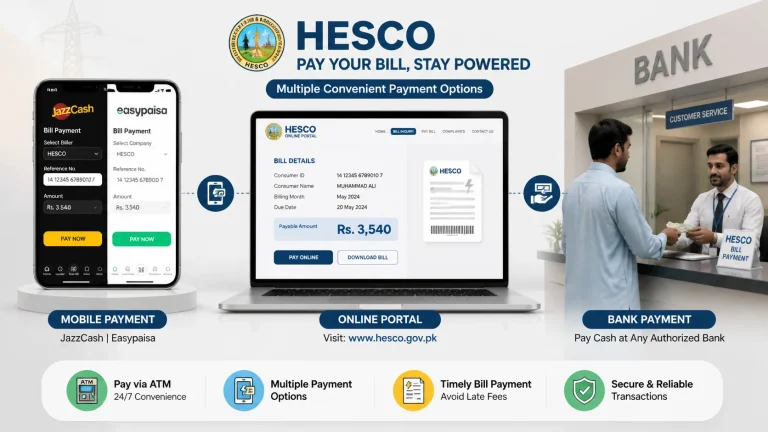
- Mobile wallet — pay via JazzCash or EasyPaisa using the reference number
After paying, upload the paid receipt to the portal using “Upload DN”, and submit a hard copy to your concerned HESCO sub-division office. Your meter cannot be installed until the demand notice is cleared and verified.
How to Track Your HESCO New Connection Application
Tracking is simple and keeps you updated without visiting an office. On the ENC portal:
- Click Track on the left sidebar.
- Select New Connection.
- Choose HESCO as your provider.
- Enter your tracking ID.
- Click Submit to view your application status.
This is also where you check whether your demand notice has been issued. If you have an existing connection and need to find your details, our guide on the HESCO reference number explains how to locate it on your bill.
How Long Does the HESCO New Connection Process Take?
Timelines depend on your connection type, location, and the completeness of your application:
- Single-phase: usually 15–30 days after the demand notice is paid
- Three-phase: usually 30–60 days after payment and verification
The biggest cause of delay is incomplete or mismatched documents, so accuracy at the application stage saves the most time overall.
💡 Expert Tip from the Field
Before you submit, walk the distance from the nearest HESCO pole to your meter board and note your required load. These two details — service-line distance and sanctioned load — drive most of your demand notice amount and most processing delays. Applicants who get them right the first time almost always clear the process faster and avoid a corrected, inflated notice.
Common Problems and How to Solve Them
Application Rejected
Cause: missing or mismatched documents. Fix: recheck every requirement — especially the wiring test report and ownership proof — before resubmitting.
No Demand Notice Issued
Cause: survey pending or verification delay. Fix: track with your ID and follow up at your sub-division office.
Wrong Demand Notice Amount
Cause: incorrect load or distance entry. Fix: request a correction before paying — adjustments are far harder afterward.
🔑 Key Takeaways
- Apply online at the ENC portal (enc.com.pk) — no office visit needed.
- Prepare CNIC, ownership proof, two witness CNICs, neighbor’s bill, and wiring test report.
- The process: Apply → Verify → Demand Notice → Pay → Install.
- Single-phase connection charge is Rs.3,000 (installments available).
- Pay the demand notice online, at a bank, or via JazzCash/EasyPaisa.
- Track your application anytime with your tracking ID.
- Installation takes 15–30 days (single-phase) or 30–60 days (three-phase).
Frequently Asked Questions
How do I apply for a HESCO new connection?
What documents are required for a HESCO new connection?
Can I apply for a HESCO new connection online?
How long does the HESCO new connection process take?
How much does a HESCO new connection cost?
How do I track my HESCO new connection application?
Already Have a HESCO Connection?
Check your latest electricity bill, view your due date, and download a duplicate copy in seconds — no login required.
Check Your HESCO Bill Online →Disclaimer: The application steps, fees, and timelines are based on HESCO’s published procedure and the official ENC portal, and may change. Always confirm current requirements on the official HESCO website, the ENC portal, and NEPRA before applying.