
Hesco Bill Online Check: The Complete 2026 Guide to View, Download & Pay Your Electricity Bill
Quick Answer: To do a Hesco Bill Online Check, visit any trusted bill portal (such as hescobill.com or hescobill.com.pk), enter your 14-digit reference number, and click “Generate Bill.” Your current electricity bill will appear on screen in seconds — no login required, completely free.
Key Takeaways
- HESCO (Hyderabad Electric Supply Company) serves over 1.17 million consumers across 12 districts of Sindh province.
- You only need your 14-digit reference number to check your bill online.
- The service is available 24/7, completely free, and works on mobile and desktop.
- You can view, download, and print a duplicate bill instantly.
- Bills can be paid via JazzCash, Easypaisa, NayaPay, bank apps, ATMs, and post offices.
- You cannot check your HESCO bill using your CNIC or mobile number alone.
- The HESCO helpline number is 118 (toll-free: 0800-00118).
What Is HESCO and Who Does It Serve?
Before jumping into the step-by-step process, it helps to understand exactly who HESCO is and why so many people in Pakistan search for the Hesco Bill Online Check every single month.
HESCO stands for Hyderabad Electric Supply Company. It is a public limited company incorporated on 23rd April 1998, formed when the Government of Pakistan restructured its power sector and replaced the old Area Electricity Board (AEB) Hyderabad with a more modern distribution entity. HESCO operates under the umbrella of WAPDA (Water and Power Development Authority) and received its business license from NEPRA (National Electric Power Regulatory Authority) on July 1, 1998.
Its core mission is clear: provide a smooth, consistent, and uninterrupted supply of electricity across southern Sindh (excluding Karachi) while delivering excellent customer service.
To manage this enormous responsibility, HESCO has structured its operations across:
- 4 Operation Circles
- 15 Operation Divisions
- 69 Operation Sub-divisions
- 6 Construction Divisions
- 5 Meter & Testing (M&T) Divisions
The company currently serves approximately 1,178,412 consumers — a number that continues to grow each year as more households and businesses connect to the grid.
Districts Covered by HESCO
HESCO provides electricity to 12 to 13 districts of Sindh Province, including:
| District | Region |
| Hyderabad | Central Sindh |
| Jamshoro | Central Sindh |
| Badin | Lower Sindh |
| Thatta | Lower Sindh |
| Mirpurkhas | Eastern Sindh |
| Sanghar | Eastern Sindh |
| Tharparkar | Eastern Sindh |
| Umerkot | Eastern Sindh |
| Tando Allahyar | Central Sindh |
| Tando Muhammad Khan | Lower Sindh |
| Matiari | Central Sindh |
| Sujawal | Lower Sindh |
If you live in any of these districts, you are a HESCO consumer and can use the online bill check service any time.
Why Check Your HESCO Bill Online?
Millions of electricity consumers across Sindh still wait days for their paper bill to arrive by post. The problem? Paper bills often arrive just one or two days before the due date — leaving almost no time to arrange a payment. Miss the deadline, and you’re hit with a late surcharge.
The Hesco Bill Online Check service solves this problem entirely. Here’s why you should be using it:
- Access your bill 7–10 days early, before the paper copy even arrives
- Download a duplicate bill if your original is lost or damaged
- Avoid late fees by knowing your due date well in advance
- Track your consumption month by month to spot unusual spikes
- Save time — no queues, no office visits, no waiting
- Works 24/7, even on public holidays and weekends
- Completely free — no subscription, no registration needed
This is especially useful during Pakistan’s peak summer months (April through October), when electricity consumption surges due to air conditioning, and billing discrepancies are more likely.
How to Do a Hesco Bill Online Check: Step-by-Step
Checking your HESCO electricity bill online is genuinely simple. Here is the exact process:
Step 1: Find Your 14-Digit Reference Number
Your reference number is printed on any previous HESCO electricity bill. Look at the top-left corner of the bill — you’ll find a 14-digit code. This is your unique identifier in the HESCO system.
Important: You can also use a 10-digit Customer ID on some platforms. However, the 14-digit reference number is the most universally accepted option.
Step 2: Visit a Trusted Bill Portal
Go to one of these reliable websites:
- hescobill.com (official-style portal, updated monthly)
- hescobill.com.pk (user-friendly interface)
- hescoebill.pk (allows browser notifications for new bills)
- pakbills.com/hesco
- checkyourbillonline.com/hesco-bill-online
All of these portals pull data from the HESCO billing system. They are free to use and require no account creation.
Step 3: Enter Your Reference Number
Type your 14-digit reference number carefully into the search field on the website. Double-check for errors — even one wrong digit will return a “bill not found” message.
Step 4: Click “Generate Bill” or “Check Bill”
Press the button and wait a few seconds. The system will retrieve your bill from the HESCO database.
Step 5: View, Download, or Print
Your bill will appear on screen with the following details:
- Consumer name and address
- Current month’s charges
- Units consumed (kWh)
- Bill issue date and due date
- Previous month’s balance
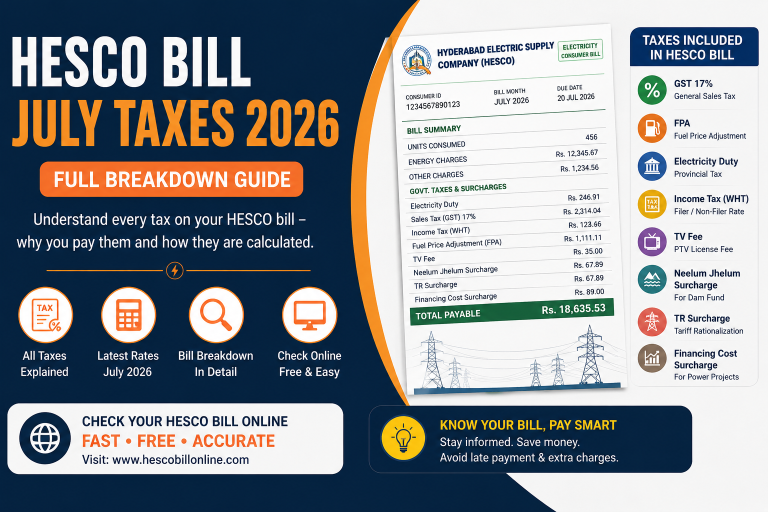
- Applicable taxes and surcharges
- Total payable amount (before and after due date)
You can then download the bill as a PDF or print it directly from your browser. This duplicate copy is fully valid for payment purposes.
What Information Appears on Your HESCO Bill?
Understanding your HESCO bill is just as important as checking it. Here’s a breakdown of the key line items you’ll see:
| Bill Component | What It Means |
| Units Consumed | Total kWh used in the billing period |
| Tariff Rate | Rate per unit based on your consumption slab |
| Fixed Charges | Monthly base charge regardless of usage |
| Fuel Price Adjustment (FPA) | Reflects fluctuating fuel costs for power generation |
| TR Surcharge | Difference between NEPRA and Government of Pakistan tariffs |
| GST | Government Sales Tax applied on electricity |
| TV License Fee | Statutory fee added to all domestic bills |
| Late Payment Surcharge | Additional amount charged if bill is paid after due date |
| Amount Before Due Date | Total payable on or before due date |
| Amount After Due Date | Higher total if payment is made late |
HESCO Electricity Tariff Rates 2026
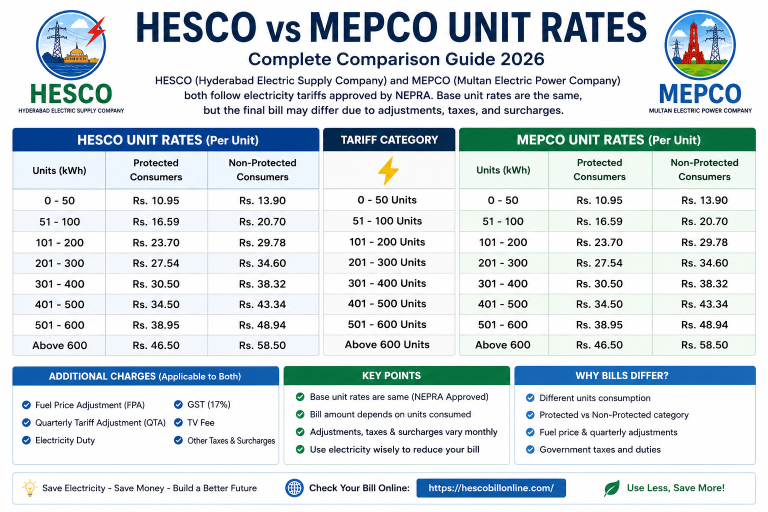
HESCO follows a slab-based tariff system approved by NEPRA. This means the rate you pay per unit depends on how much electricity you use in a month. There are two main consumer categories:
Protected Consumers (those using 200 or fewer units in the past 6 months):
- Benefit from subsidized, lower rates
- Pay as little as Rs. 7 per unit for the first 50 units
Non-Protected Consumers:
- Pay higher slab-based rates
- Rates typically range from Rs. 22 to Rs. 65 per unit, depending on monthly consumption
Note: Tariff rates are subject to change by NEPRA. Always verify the latest rates through the official NEPRA website or your billing portal.
Peak hours also affect your consumption indirectly. HESCO-designated peak hours are:
- April to October: 6:30 PM – 10:30 PM
- November to March: 6:00 PM – 10:00 PM
Minimizing heavy appliance use during these hours (air conditioners, washing machines, water motors, irons) can meaningfully reduce your monthly bill.
How to Pay Your HESCO Bill Online
Once you’ve done your Hesco Bill Online Check, paying is the next step. HESCO consumers have multiple convenient payment options available:
Mobile Wallets (Most Popular)
- JazzCash — Dial *786#, select Electricity, choose HESCO, enter your reference number, and confirm with OTP
- Easypaisa — Available via app or *786# mobile menu
- NayaPay — Digital wallet with full bill payment support
- UBL Omni — Convenient for consumers with UBL accounts
Internet Banking & Mobile Apps
All major Pakistani banks offer utility bill payment through their mobile apps and internet banking portals, including:
- HBL Mobile
- MCB Mobile
- Meezan Bank App
- Bank Alfalah (Alfa)
- Standard Chartered Mobile
ATM Machines
Visit any bank ATM, select “Utility Bill Payment,” choose HESCO, and enter your reference number. Payment is instant.
Post Offices and Bank Branches
Print your downloaded duplicate bill and take it to any National Bank of Pakistan (NBP) branch, post office, or designated payment center. This remains the most common method for consumers who prefer cash payments.
Common Issues with HESCO Bill Online Check (And How to Fix Them)
Even a simple digital process can run into hiccups. Here are the most frequently reported problems and their solutions:
Invalid Reference Number Make sure you’ve entered all 14 digits correctly. Avoid spaces or extra characters. Check your old physical bill for the exact number.
Bill Not Found Your bill may not have been generated yet for the current month. Try again after a few hours or the next day. Bills typically become available 7–10 days before the due date.
Website Not Loading The portal may be temporarily down due to high traffic or maintenance. Wait a few minutes and refresh, or try an alternative portal.
Bill Status Shows “Blocked” This occurs when there is a payment dispute or outstanding arrears flagged in the system. Visit your nearest HESCO office to resolve this — it cannot be fixed online.
Printing Issues Ensure your browser is up to date and your printer drivers are properly installed. Alternatively, download the PDF and print from Adobe Reader or a PDF viewer.
How to Get a Duplicate HESCO Bill
If you never received your paper bill or misplaced it, getting a duplicate is straightforward:
- Visit any of the bill portals mentioned above
- Enter your 14-digit reference number
- The bill will appear instantly
- Download as a PDF or print directly
This duplicate bill is legally valid for payment at any bank, post office, or mobile payment platform. You do not need to visit a HESCO office or request a duplicate through any formal process.
HESCO Bill Online Check vs. Visiting the HESCO Office: A Comparison
| Feature | Online Check | Office Visit |
| Time Required | Under 1 minute | 30–90 minutes |
| Available Hours | 24/7 | Business hours only |
| Cost | Free | Free (but travel costs apply) |
| Duplicate Bill Access | Instant | May take time |
| Bill Payment | Available online | Available in person |
| Complaint Registration | Via helpline/email | In person |
| Accessibility | Mobile & desktop | Physical visit required |
The case for using the online service is overwhelming. Unless you have a billing dispute that requires in-person resolution, everything can be handled digitally.
HESCO Helpline and Customer Support
For complaints, outages, billing disputes, or any electricity-related issues, HESCO provides several official support channels:
- HESCO Helpline: 118
- Toll-Free Number: 0800-00118
- Headquarters Address: WAPDA Complex, Hussainabad, Hyderabad, Sindh, Pakistan
- Online Complaint System: Available through the official HESCO portal
If you want to change your reference number or update your account name (for example, after purchasing a new property), you must visit the HESCO headquarters in person.
Tips to Lower Your HESCO Electricity Bill
Checking your bill is one thing — reducing it is another. Here are practical tips that actually work:
- Avoid heavy appliances during peak hours (see timings above)
- Switch to energy-efficient appliances — inverter ACs, LED lights, and 5-star-rated equipment draw significantly less power
- Monitor your monthly consumption using the online bill check and compare it month over month
- Check for meter reading errors — if your units seem unusually high, report it to HESCO
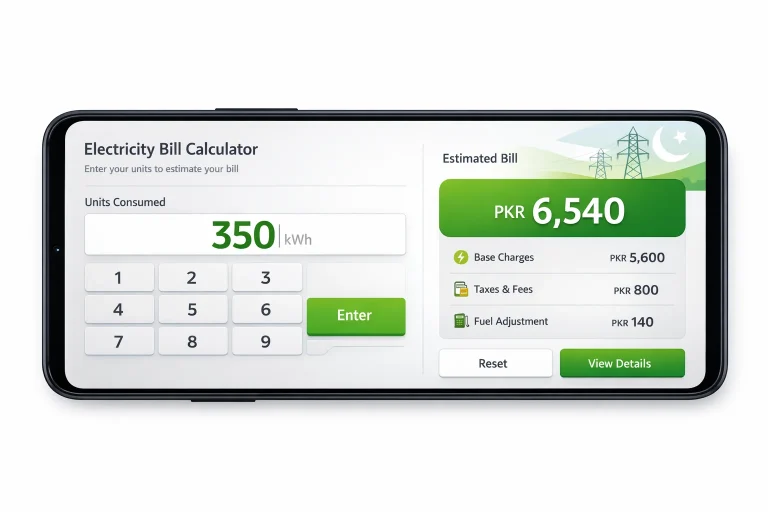
- Use the HESCO Bill Calculator available on most portals to estimate your bill before it’s generated
- Pay before the due date — even one day late adds a late payment surcharge that increases your total amount
Frequently Asked Questions (FAQ)
How do I check my HESCO bill online?
Go to a trusted portal like hescobill.com, enter your 14-digit reference number, and click “Generate Bill.” Your bill appears instantly on screen.
What is the reference number for HESCO bill?
It is a 14-digit unique identifier printed on the top-left corner of your electricity bill. It is required for all online bill lookups.
Can I check my HESCO bill using my CNIC?
No. HESCO bills can only be checked using the 14-digit reference number or a 10-digit Customer ID. CNIC and mobile numbers are not accepted for bill retrieval.
Is HESCO bill online check free?
Yes, completely free. No registration, no login, and no subscription is required. The service is available 24/7.
How do I download a duplicate HESCO bill?
Enter your reference number on any HESCO bill portal, view the bill, and use the “Download PDF” option to save or print it.
Can I pay my HESCO bill through JazzCash?
Yes. Dial *786# on your phone, go to the electricity section, select HESCO, enter your reference number, and confirm with an OTP.
What is the HESCO helpline number?
Call 118 for customer support, or the toll-free number 0800-00118.
Why is my HESCO bill so high?
High bills are usually caused by increased unit consumption, changes in tariff slabs, fuel price adjustments (FPA), or meter reading errors. Use the online bill calculator to break down the charges.
When are HESCO peak hours?
April to October: 6:30 PM to 10:30 PM. November to March: 6:00 PM to 10:00 PM.
How many districts does HESCO cover?
HESCO covers 12 to 13 districts of Sindh Province, including Hyderabad, Jamshoro, Badin, Thatta, Mirpurkhas, Sanghar, Tharparkar, Umerkot, Tando Allahyar, and others.
Conclusion: Take Control of Your Electricity Bill Today
Managing your electricity expenses in Pakistan doesn’t have to be stressful. The Hesco Bill Online Check service puts everything you need right at your fingertips — your current bill, due date, payment history, and consumption data — all accessible in under a minute, for free, at any hour of the day.
Whether you’re a homeowner in Hyderabad, a business owner in Mirpurkhas, or a tenant in Badin, you no longer need to wait for a paper slip or stand in a queue at the HESCO office. The digital tools are already there. Use them.
Take action right now: Visit hescobill.com, enter your 14-digit reference number, check your current bill, and set a reminder to pay before the due date. It takes less time than making a cup of chai — and it could save you from an unnecessary late payment surcharge this month.